

Sending an email is easy.
Proving it genuinely came from your business is another matter.
As Microsoft, Google and Yahoo continue to tighten their email requirements, email sender authentication is becoming increasingly important for businesses of all sizes.
It's little wonder email remains a favourite target for cyber criminals. Industry research consistently shows that more than 90% of cyber attacks begin with a phishing email.
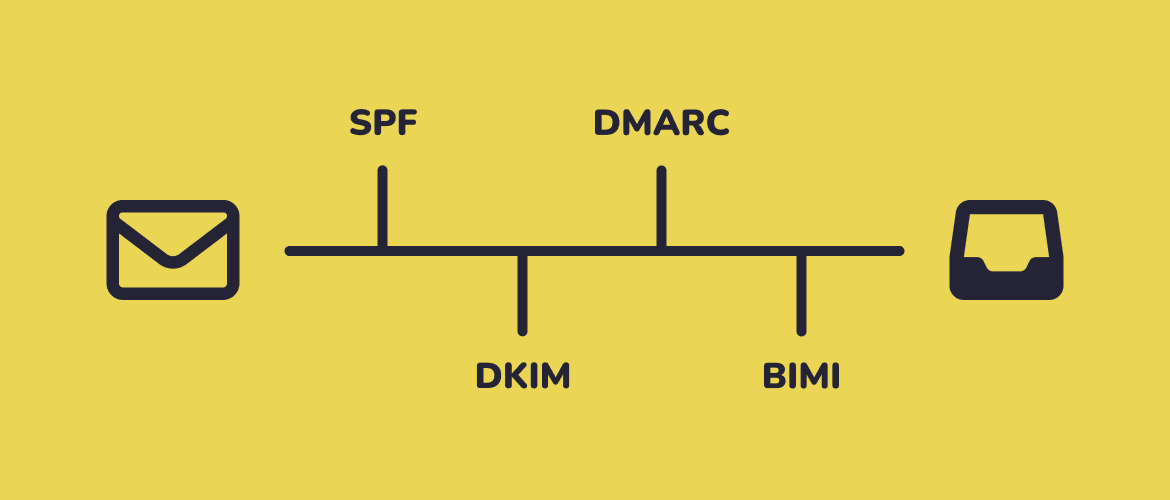
Let's look at what it is, why it matters, and how SPF (Sender Policy Framework), DKIM (DomainKeys Identified Mail), DMARC (Domain-based Message Authentication, Reporting and Conformance) and BIMI (Brand Indicators for Message Identification) work together to protect your emails and your reputation.
What is email sender authentication?
Email sender authentication is a way of proving that an email genuinely came from the organisation it claims to be from.
Think of it as a digital identity check for your emails.
Before a receiving mail server delivers a message to someone's inbox, it can perform a series of checks to verify that the sender is legitimate and hasn't been impersonated.
Without these checks, anyone could send an email pretending to be your business.
In fact, this is exactly how many phishing and spoofing attacks work.
Email sender authentication helps prevent this by allowing email providers to verify who is authorised to send emails on behalf of your domain.
It also helps improve email deliverability, making it more likely that your messages reach the inbox rather than the spam folder.
Several technologies work together to make this possible, including SPF, DKIM, DMARC and BIMI, which we'll cover shortly.
Test your Domain
Why email sender authentication matters
For many businesses, email is the primary way they communicate with customers, suppliers, and colleagues. If those emails aren't trusted, problems can quickly follow.
Email sender authentication helps protect your business from cyber criminals who attempt to impersonate your domain. It also gives email providers greater confidence that your messages are legitimate, improving the chances of them reaching the inbox.
The benefits go beyond security alone. Effective email authentication can help improve email deliverability, strengthen trust in your brand, and reduce the risk of fraudulent emails being sent in your company's name.
Let's take a closer look at each of these benefits:
📥 Better email deliverability
You could write the perfect email, but it won't achieve much if it never reaches the inbox.
Email providers such as Microsoft, Google, and Yahoo use authentication checks to help determine whether an email is legitimate.
Businesses with properly configured email authentication are more likely to reach the inbox, while unauthenticated emails face a greater risk of being filtered as spam or rejected altogether.
💡 Email authentication is no longer simply best practice. Major providers including Google and Yahoo now require SPF, DKIM and DMARC for bulk email senders to help improve trust across the email ecosystem (MX Toolbox)
🛡️ Protection against phishing and spoofing
Phishing attacks often rely on impersonation.
A cyber criminal sends an email that appears to come from a trusted organisation in an attempt to trick someone into clicking a link, sharing information, or making a payment.
Email sender authentication helps prevent this by making it much harder for attackers to send emails using your domain.
While it isn't a silver bullet, it is one of the most effective ways to reduce the risk of email spoofing.
💡 The scale of the problem continues to grow. Phishing campaigns regularly exceed five million attacks every month, making email authentication one of the most effective ways to reduce impersonation risk (Microsoft)
🤝 Improved trust and reputation
Trust takes time to build and only moments to lose.
When customers, suppliers, and partners consistently receive legitimate emails from your organisation, it strengthens confidence in your brand.
On the other hand, if emails are regularly flagged as suspicious or your domain is used in phishing attacks, your reputation can quickly suffer.
Email sender authentication helps demonstrate that your organisation takes security seriously and gives recipients greater confidence that your emails are genuine.
The technologies behind email sender authentication
Email sender authentication isn't a single technology.
Instead, it relies on several standards working together to verify the identity of the sender and help receiving mail servers decide whether an email can be trusted.
The four most common technologies are SPF, DKIM, DMARC and BIMI.
Each plays a different role, but together they help protect your domain, improve email deliverability, and build trust in your communications.
📧 SPF (Sender Policy Framework)
SPF is used to identify which mail servers are authorised to send emails on behalf of your domain.
Think of it as a guest list.
It tells receiving email providers which systems are allowed through the door and which should be turned away.
For example, if your business uses Microsoft 365, Mailchimp, or a CRM platform to send emails, SPF helps confirm that these services are authorised to send messages using your domain name.
Without SPF, it becomes much easier for attackers to impersonate your business.
🔏 DKIM (DomainKeys Identified Mail)
DKIM helps prove that an email hasn't been altered after it was sent.
Every authenticated email contains a unique digital signature.
When the message arrives, the receiving email provider checks that signature to verify that the content hasn't been changed in transit.
Think of DKIM as a tamper-evident seal on a package.
If the seal is intact, the recipient can be confident that what's inside is exactly what was sent.
This helps improve trust in your emails and reduces the likelihood of them being treated as suspicious.
🛡️ DMARC (Domain-based Message Authentication, Reporting and Conformance)
DMARC builds on SPF and DKIM by telling receiving email providers what to do when authentication checks fail.
Think of DMARC as the security guard enforcing the rules. If an email fails authentication, DMARC can instruct the receiving system to monitor it, send it to spam, or reject it entirely.
DMARC also provides valuable reporting, allowing organisations to see who is sending emails on behalf of their domain and identify potential spoofing attempts.
For many businesses, DMARC is the most important piece of the puzzle because it turns authentication into action.
💡 Despite its importance, adoption remains low. Research from EasyDMARC found that only 7.7% of the world's top 1.8 million domains have implemented the strongest DMARC enforcement policy (p=reject).
🏷️ BIMI (Brand Indicators for Message Identification)
BIMI allows organisations to display their verified logo alongside emails in supported inboxes.
Think of it as your company's badge of authenticity. Rather than simply seeing a sender name, recipients can also see a recognised brand logo, helping to build trust before they even open the message.
Unlike SPF, DKIM and DMARC, BIMI isn't primarily a security technology. Instead, it builds on strong authentication by providing a visible sign that your domain is properly protected.
To use BIMI, organisations typically need a correctly configured DMARC policy, making it one of the final steps in a mature email authentication strategy.
How SPF, DKIM, DMARC and BIMI work together
While each technology serves a different purpose, they are designed to work together.
- SPF verifies that the email was sent from an authorised system.
- DKIM confirms that the message hasn't been altered in transit.
- DMARC checks the results of both and tells receiving email providers how to handle messages that fail authentication.
Together, these technologies help answer 3 important questions:
- Is this sender authorised?
- Has the message been changed?
- What should happen if something doesn't look right?
Once SPF, DKIM and DMARC are correctly configured, organisations can then implement BIMI to display their verified logo in supported inboxes.
Think of it this way:
- SPF checks who's at the door.
- DKIM checks they haven't tampered with the package.
- DMARC decides whether they're allowed in.
- BIMI lets them wear the company uniform.
Individually, each technology provides value.
Together, they create a much stronger and more trustworthy email ecosystem.
What happens when email sender authentication is missing?
Without proper email sender authentication, email providers have less confidence that your messages are genuine.
As a result, legitimate emails may struggle to reach their intended recipients, while cyber criminals may find it easier to impersonate your business.
The consequences can range from minor frustrations to serious security and reputational risks:
📂 Emails land in spam
If email providers can't verify who sent a message, they're more likely to treat it as suspicious.
This can lead to legitimate emails being filtered into spam folders or blocked entirely, reducing the effectiveness of your communications and increasing the chance of important messages being missed.
🎭 Increased risk of impersonation
Without authentication controls in place, attackers may be able to send emails that appear to come from your organisation.
These spoofed emails can be used to target customers, suppliers, or employees, potentially leading to fraud, credential theft, or malware infections.
📉 Reduced sender reputation
Email providers monitor the reputation of sending domains over time.
If unauthorised emails are regularly sent using your domain, or your authentication records are poorly configured, your sender reputation can suffer.
Once damaged, restoring that reputation can take considerable time and effort.
💡 Google recommends keeping spam complaint rates below 0.3%, with anything higher increasing the risk of messages being filtered or rejected (EasyDMARC)
💼 Lost business opportunities
Sometimes the impact is simply commercial.
Missed enquiries, delayed quotes, failed password resets, and unopened marketing campaigns can all result from poor email deliverability.
If your emails aren't reaching the inbox, you're relying on recipients to find them rather than ensuring they arrive where they should.
Common email authentication mistakes businesses make
Setting up email authentication isn't particularly complicated, but there are a few common mistakes that can reduce its effectiveness:
⚠️ Assuming Microsoft 365 handles everything automatically
Microsoft 365 includes many security features, but email authentication isn't always fully configured out of the box.
Businesses often assume they're protected because they're using Microsoft 365, only to discover that key authentication records haven't been implemented or maintained correctly.
⚠️ Implementing SPF without DKIM and DMARC
SPF is an important first step, but it isn't enough on its own.
Without DKIM and DMARC, email providers have fewer ways to verify the authenticity of your messages, making it harder to prevent spoofing and improve deliverability.
⚠️ Forgetting about 3rd-party email services
Many organisations use multiple systems to send email, including marketing platforms, CRM systems, helpdesk software, and website forms.
If these services aren't included in your authentication records, legitimate emails may fail authentication checks and struggle to reach the inbox.
⚠️ Never monitoring authentication reports
Authentication isn't a set-and-forget exercise.
DMARC reports can provide valuable insight into who is sending emails from your domain and highlight potential configuration issues or unauthorised activity.
Ignoring these reports means missing opportunities to improve your security and deliverability.
⚠️ Trying to implement BIMI before DMARC
Many organisations are attracted to BIMI because of the visible branding benefits.
However, BIMI relies on a properly configured DMARC policy.
Attempting to implement BIMI before establishing a strong authentication foundation can lead to frustration and unnecessary complexity.
How to improve your email sender authentication
The good news?
Most email authentication issues can be resolved with a structured approach.
🔍 Audit your email ecosystem
Start by identifying every service that sends email on behalf of your business.
This might include Microsoft 365, marketing platforms, CRM systems, website forms, helpdesk software, and automated notification services. You can't authenticate what you don't know about.
⚙️ Configure SPF correctly
Review your SPF record to ensure it includes all authorised email sending services.
An incomplete SPF record can cause legitimate emails to fail authentication checks, while an overly complex one can create its own problems.
✍️ Enable DKIM
DKIM adds an additional layer of trust by digitally signing your emails.
Most modern email platforms support DKIM, but it often needs to be enabled and configured before it becomes effective.
🛡️ Implement DMARC
DMARC ties everything together by enforcing your authentication policies and providing visibility into how your domain is being used.
Many organisations start with a monitoring policy before gradually moving to stricter enforcement as they gain confidence in their configuration.
🏷️ Consider BIMI once DMARC is enforced
Once SPF, DKIM and DMARC are working correctly, BIMI can help reinforce trust by displaying your verified logo in supported inboxes.
While it won't improve security on its own, it can enhance brand recognition and provide recipients with additional confidence that your emails are genuine.
📈 Monitor and maintain your configuration
Email authentication isn't a one-time project.
New systems get introduced, services change, and email requirements continue to evolve. Regular reviews and monitoring help ensure your authentication remains effective and continues to support both security and deliverability.
Why email authentication is becoming a business requirement
Not so long ago, email authentication was considered a best practice.
Today, it's increasingly becoming an expectation.
Major email providers such as Microsoft, Google, and Yahoo are continuing to tighten their requirements in an effort to reduce spam, phishing, and email fraud.
As a result, businesses that fail to implement proper authentication may find it harder to reach the inbox.
Microsoft's changing requirements
Microsoft has been increasing its focus on email security and sender reputation across Outlook and Microsoft 365.
Authenticated email helps Microsoft verify legitimate senders and reduce the volume of fraudulent messages reaching users.
Organisations that don't follow recommended authentication standards may experience reduced deliverability over time.
💡 The direction of travel is clear. Microsoft, Google, Apple and Yahoo all now expect organisations to authenticate email using SPF, DKIM and DMARC to improve deliverability and reduce abuse (Valimail)
Google's changing requirements
Google has introduced stricter requirements for bulk email senders and continues to place greater emphasis on sender authentication.
Businesses that send newsletters, marketing campaigns, or large volumes of email are increasingly expected to have SPF, DKIM, and DMARC configured correctly.
Yahoo's changing requirements
Yahoo has followed a similar path, strengthening its authentication requirements to improve trust and reduce abuse.
Like Google, Yahoo now expects organisations sending significant volumes of email to adopt modern authentication standards.
What this means for SMEs
The important thing to remember is that these requirements aren't just aimed at large enterprises.
Whether you're sending ten emails a day or ten thousand, email providers are looking for the same signals of trust.
Proper email authentication helps demonstrate that your messages are legitimate, protects your reputation, and improves the likelihood of your emails reaching the inbox.
In short, email authentication is no longer just a technical consideration.
It's becoming an essential part of doing business online.
Final word
Email sender authentication might sound technical, but its purpose is simple:
Helping email providers trust that your messages are genuine.
By implementing SPF, DKIM, DMARC, and BIMI, businesses can improve email deliverability, reduce the risk of impersonation, strengthen their reputation, and build greater trust with customers and suppliers.
As email providers continue to tighten their requirements, organisations that take email authentication seriously will be better placed to keep their communications secure and their emails landing where they belong.
If you're unsure whether your email authentication is configured correctly, or you'd like help implementing SPF, DKIM, DMARC, or BIMI, we can help.